An agentic workspace for small teams.

Where teams and agents work from the same context and execute together, keeping the team fast and the costs low.

The product is still under active development. Help us shape it with your feedback and feature requests. :)

By joining now, you're helping build what small teams actually need. Next up is the invite-only beta.

Why Neaven?

Most “all-in-one” workspaces still ask someone to set up roles, boards, and processes before the team can use them. A small team rarely has that person, or a fixed way of working.

01Built for a company ten times your size

Big teams need layers of structure and control. As collaboration tools serve those needs, small teams inherit setup and process they never asked for. Your direction changes weekly; your people cover several roles.

02You're the only one who sees the whole picture

Context sits in different tools, or in a few people's heads. GitHub knows the code. Stripe knows payments. Your CRM knows customers. Team conversations hold decisions that never made it into a document. You end up becoming the bottleneck that pieces it all together.

03Stop re-explaining your company every time

Neaven connects those parts for people and agents in one workspace. The team can ask what happened, decide what to do, and execute the next step without rebuilding the company brief. Structure grows only when the team needs it.

What you can do in Neaven

Four ways the workspace helps a small team work with AI.

01 / 04

Collaborate in the same agent session

Multiple teammates can join the same live agent session. They can watch the work, redirect it, and hand it off without starting separate chats or passing around a read-only transcript. That is multiplayer AI.
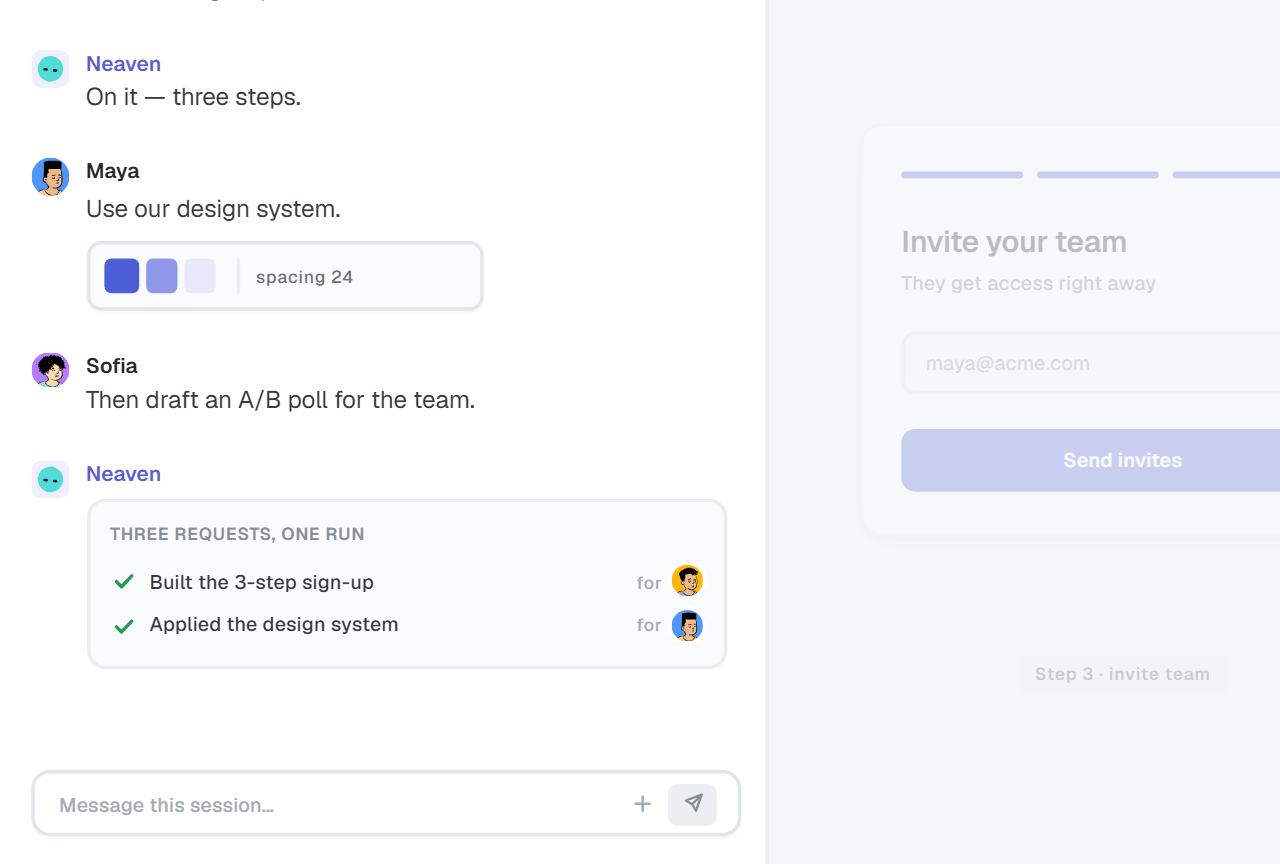
Three teammates type into the same agent session while the agent builds, restyles and ships an onboarding flow.
Three people in one session. One agent, keeping all three straight.
02 / 04

Answers from your real data

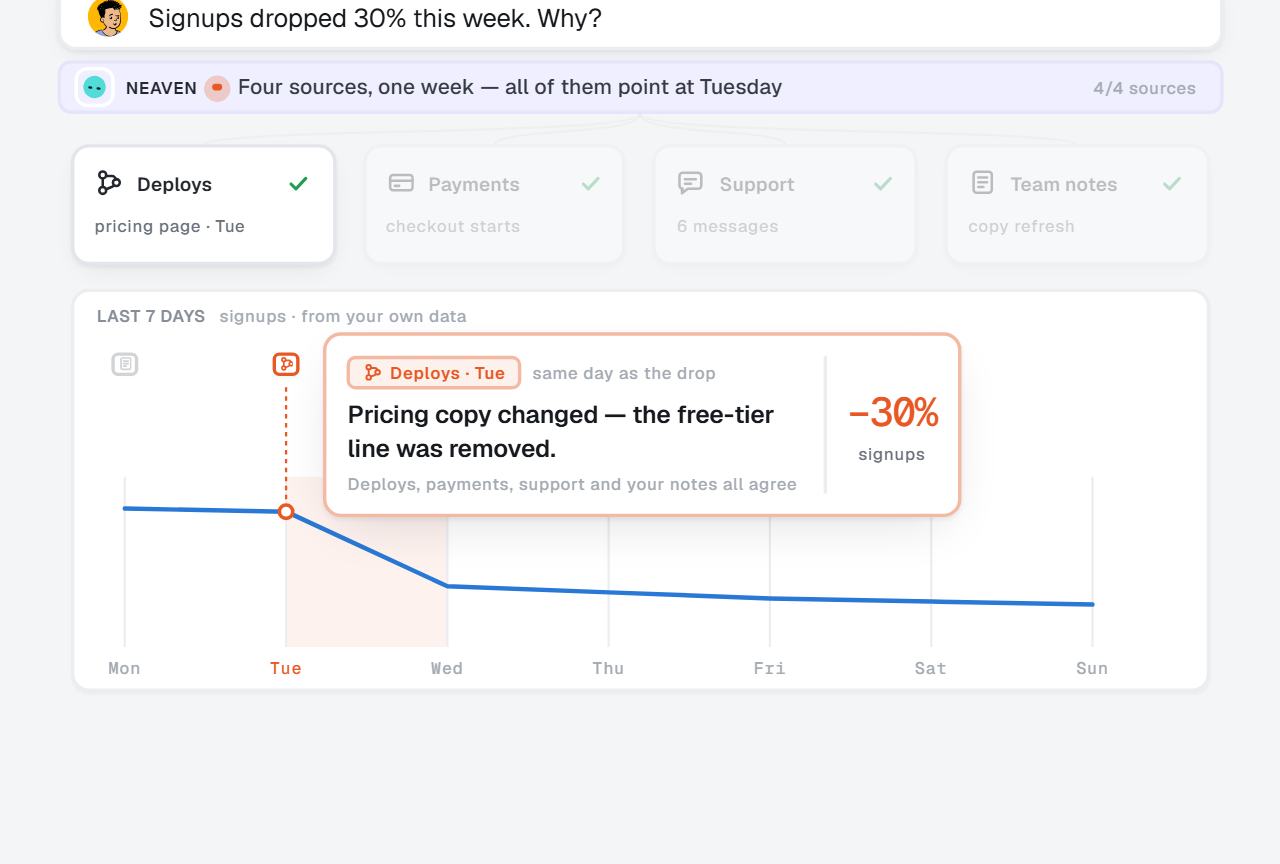
Neaven connects the dots for you. Ask in plain language: it already holds your context — the tools your work runs on, the decisions in your threads, your team’s own notes — so one agent reads across all of it at once and tells you what actually happened, with the evidence and the fix in the same place.

An agent reads four connected tools, lines their evidence up with the signup drop, names the cause and reverts it.
Four connected tools, one cause — answered from your own data.
03 / 04

Get your custom workspace in seconds

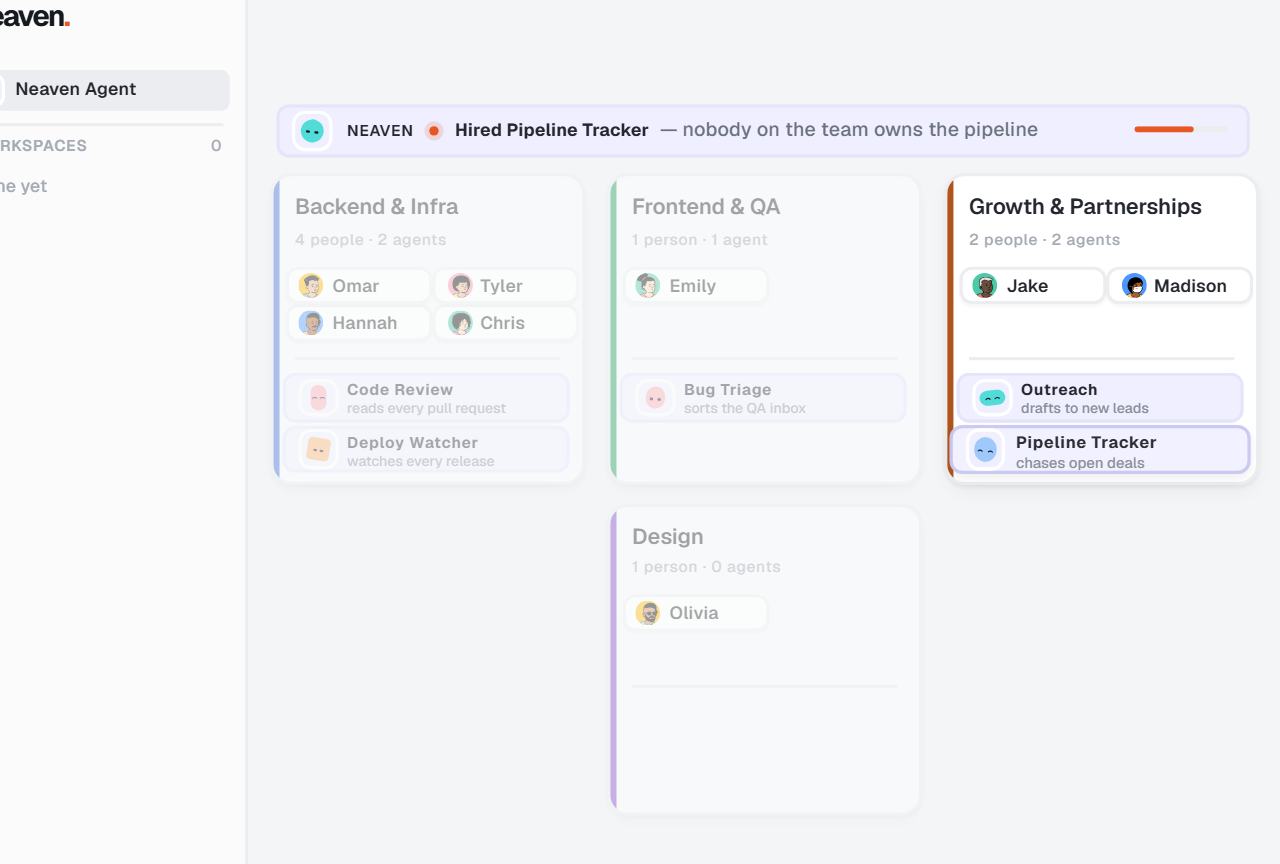
Tell Neaven what your team is working on. AI creates a workspace around the current priorities, so the team can focus on what matters instead of arranging boards and roles.

Eight people described in one message become five workspaces with scoped agents, editable before anything is created.
Describe the team. Get the workspaces — and what each agent is for.
04 / 04

Track tasks and progress in real time

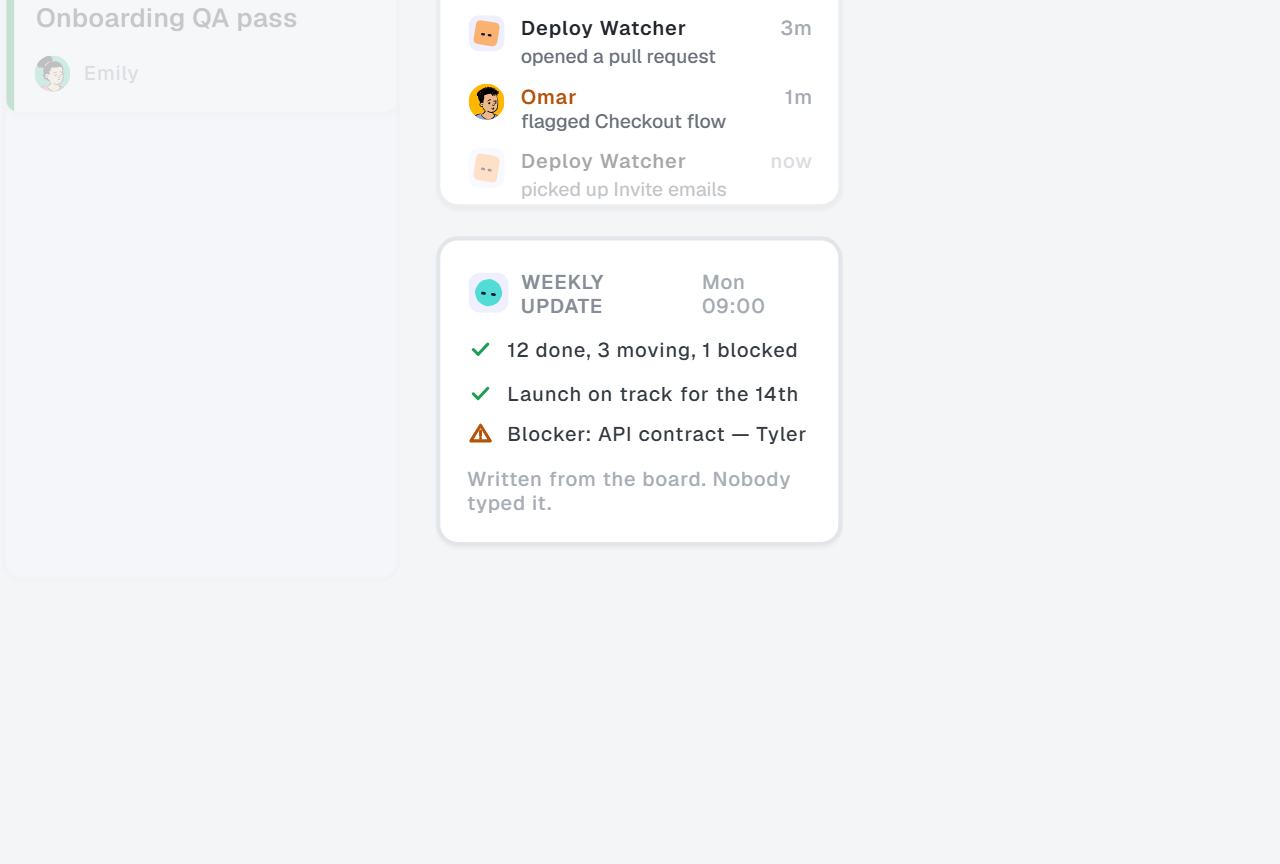
See what teammates and agents are doing, what is blocked, and what has changed. Everyone works from the same current view of the work.

A teammate and an agent move work on a shared board while a blocker names what it is waiting on.
Nobody has to ask where things stand. The board already answered.

Teams and agents share the same real-time context.

Your connected tools do not wait for you to go and check them. Comments, emails, analytics and payments arrive in the workspace as they happen, and Neaven reads them together. When the same thing shows up in three places at once, it says so — and it brings back the decision your team already made about it, quoted, with who made it and when. You answer the same hour, not at the end of the week.

Live comments, emails and analytics stream in, an agent spots one repeated question across all three, quotes the team’s own earlier decision, and drafts the reply.
Three live sources, one pattern — and the decision your team already made.

Your team’s knowledge is queryable from the tools you already use.

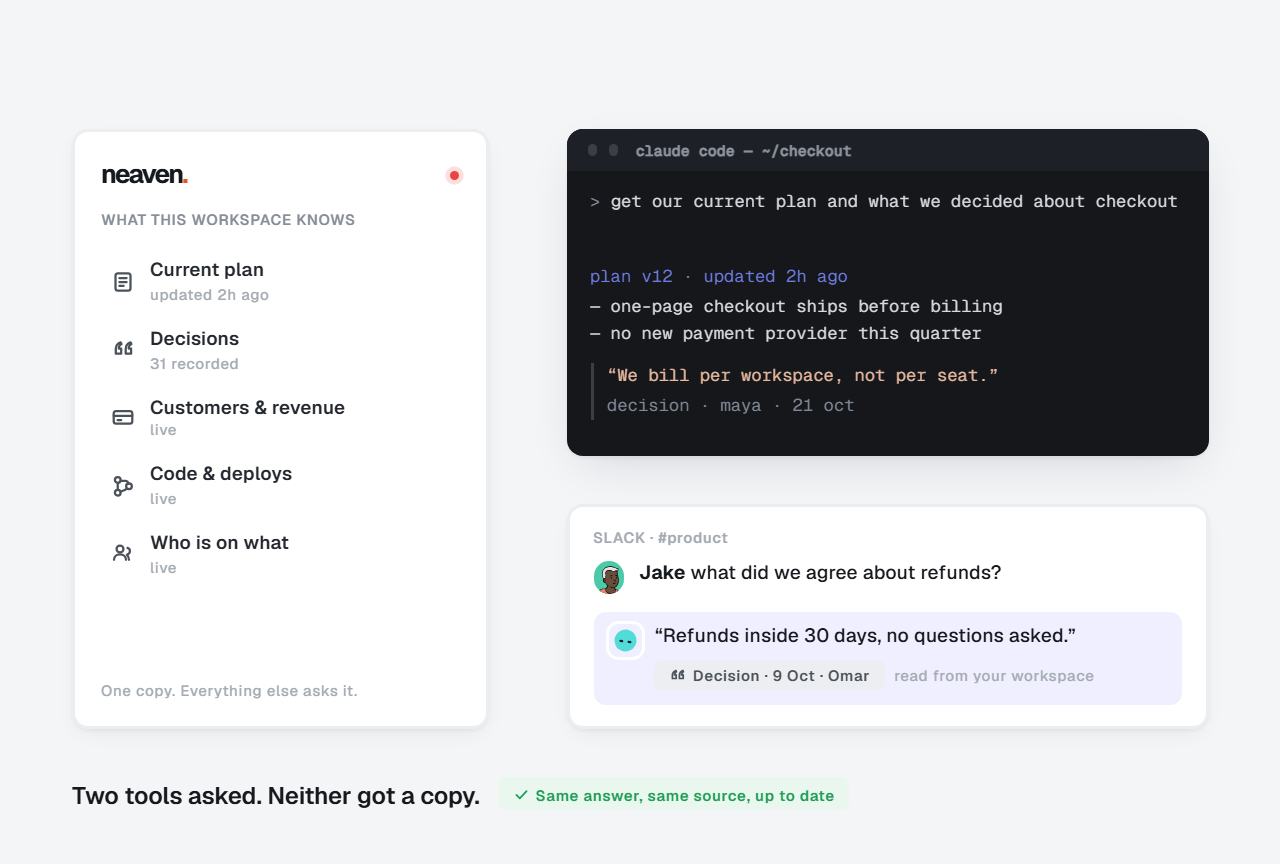
Plans, decisions and signals from connected tools become one source of truth — and you can read it from wherever you work. A coding agent in your terminal can pull the current plan and the decisions behind it before it writes a line. A teammate in Slack can ask what was agreed and get the answer with its source attached. Think of it as an API for what your team knows, not another place to copy documents into.

A coding agent in a terminal and a teammate in Slack both query the Neaven workspace and get the current plan and decisions, each answer citing its source.
Asked from a terminal and from Slack. Answered from the same live context.

Bring your existing work. Start from there.

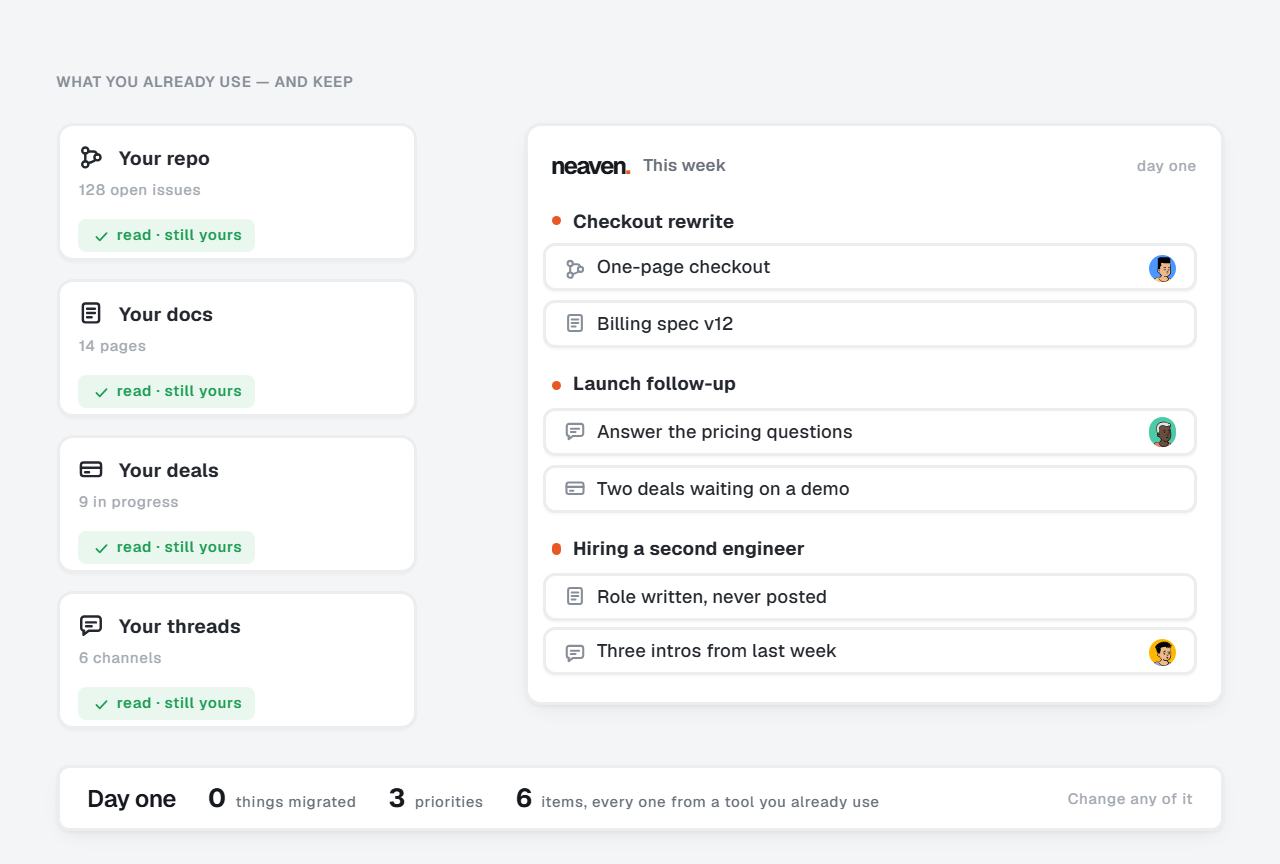
There is nothing to migrate. Connect the tools you already work in and Neaven reads them where they are — the repo, the docs, the open deals, the threads. So your first screen is not an empty board: it is the work that is already in flight, grouped by what actually matters this week. Nothing is copied, nothing is moved, and you can change any of it.

Four connected tools are read in place and become a workspace already filled with in-flight work, each item showing the tool it came from.
Day one is not an empty board. It is the work you already have.
Who it's for

Neaven is a good fit if you are...

A small team building toward a product or improving one, with overlapping roles and priorities that move quickly.

  • Building a product or growing one with people who take on more than one role.
  • Already using tools that hold different parts of the company's context.
  • Ready to work with AI agents as part of the team, not in isolated chats.
  • Changing priorities often and wanting structure that's designed for that.
  • More interested in getting work done than managing an agent-orchestration system.

Before Neaven, and after

Each tool does its job. Keeping the conversations, docs, tasks and AI sessions lined up becomes a job of its own — and it is usually yours.

The workBefore NeavenAfter Neaven
DecisionsDecided in a thread. Someone has to remember to update the task, and tell the agent.The decision lives on the work, and the agent quotes it.
Company knowledgePlans in a doc, kept current by hand, disconnected from what actually shipped.One context the team and its agents both read from.
TasksA board someone updates after the fact, usually the day before a review.The board moves as the work moves.
Agent sessionsEveryone briefs their own chat. The next person gets a transcript, not the work.Anyone can step into the live session and steer it.
The full pictureFour tabs and an afternoon to find out what changed and why.One question, answered from every connected tool.
Agent coordinationPrompts, access and handoffs spread across tools. Someone becomes the manager of the agents.You hand the work to the team’s agent.

More tabs can make you feel productive while you become the integration layer. Neaven keeps the context and the work together, so the team can get something done. Use it as your workspace on its own, or connect the tools you want to keep.

Plans and prices are further down. AI usage is billed separately through your own API keys, and connected services you choose to keep may have their own charges.

What other AI workspaces leave you doing

Adding AI to the workspace does not remove the coordination job. It can give you one more place to manage.

If you chooseWhat stays on your plateWhat Neaven takes off it
ClickUpThe hierarchy does not maintain itself. Each pivot means deciding which Space, Folder, List, and status now owns the work, then teaching the team and its agents the new map.Start with today’s context; let structure follow the work.
NotionYes, agents can read and write Notion through MCP. That gives access to pages, not a guarantee that an unwritten decision, recent deploy, and customer signal have been connected. You still do that stitching.Keep the company context and its execution together.
SlackA conversation is not an outcome. You still have to decide which message became a task, which customer signal mattered, and where the agent’s work can be continued.Make the decision, evidence, and work one thread.
ChatGPT SpaceYou can share a page that people and agents worked on. That is different from several teammates stepping into the same live agent run to redirect the work while it happens.Work together in the live session, not only on its output.

Product names link to their documentation. Neaven is still in development; these are the workflows we are building for.

Start small. Add the team. Add the agents.

You pay per seat for the workspace: the shared context, the live sessions, the agents that keep working. AI usage is separate. Your team brings its own API keys, so you pay your AI provider directly and Neaven never takes a cut of it.

Hobby

Try Neaven on real work.

Freefor every seat

  • Just you, for 60 daysThen your data resets. Great for trying it, not for keeping it.
  • As many agents as you likeThey run when you ask. None stay on in the background.
  • 3 connected apps
  • 1 GB of storage
Join the waitlist
Where teams start

Plus

Your whole team, in one live session.

$15per seat / month

Everything in Hobby, with no reset, plus:

  • Multiplayer sessionsTeammates join the same live agent run and steer it together.
  • Bring your own agentsConnect Claude Code and other custom agents to the same context.
  • 1 always-on agent per seatIt keeps watching and working in the cloud while you are away. Shared across the team.
  • Up to 10 connected apps
  • 5 GB of storage per seat
Join the waitlist

Pro

For teams that run on agents.

$25per seat / month

Everything in Plus, with much higher limits:

  • 2 always-on agents per seatMore of your work watched around the clock.
  • Up to 30 connected appsEvery tool your work runs on, not just the main ones.
  • 25 GB of storage per seatA history long enough to be worth asking questions of.
Join the waitlist

Business

For teams that need security sign-off.

$55per seat / month

Everything in Pro, with higher limits and the controls a security team asks about:

  • 5 always-on agents per seatNeed more? We will size it with you.
  • Up to 100 connected apps, 100 GB per seat
  • Single sign-on (SSO)
  • Roles and permissionsDecide who sees what, and what agents may touch.
  • Audit logA record of what every person and agent did.
  • Data retention and export controls
  • Security review and a signed data processing agreement
  • Priority support
Join the waitlist

Prices are per seat, per month, for the platform only. You can create as many agents as you like. The limit is how many stay always-on, because each one keeps its own cloud computer running. The AI model usage itself is billed by your own provider through your API keys, and connected services you choose to keep may have their own charges. Exact limits may change before access opens.

Frequently asked questions

Short answers about what Neaven is and how access will work.

Why does Neaven exist?

Neaven started with a problem I felt while building with a friend and co-founder. We worked on different parts of the company and sometimes lost track of the same vision, spending time on things that did not matter. Before I touched the code, he had to catch me up on architectural decisions; we had to do the same for decisions about distribution. Our agents had separate contexts too. Asking ChatGPT or Claude “How are we doing, and what should we do next?” meant a 20-minute briefing and reconnecting the dots again next time. The tools could tell us what happened, but the why and what next still fell to us. Neaven is the shared context and workspace we wished we had.

Can I use Neaven if I am not technical?

Yes. You can ask questions, create agents, and work in your workspace without writing code. Technical teammates can connect their development tools to the same context.

Is Neaven a good fit for a small team?

That is exactly who it is for. On a small team priorities change often and people cover more than one role. Neaven starts with your current work and adds structure when you need it, rather than asking someone to configure a fixed process first.

What are the pricing plans?

Neaven charges per seat, per month, for the platform. Hobby is free, Plus is $15, Pro is $25 and Business is $55. AI usage is separate: your team uses its own API keys, so you pay your AI provider directly and Neaven does not charge for it. Connected-service charges also remain separate.

How do I get access?

Click “Join the waitlist” and enter your work email. We will contact you when access opens.

What is Neaven not?

Neaven is not another chatbot that needs a new company briefing each time. You can use Neaven as your workspace and connect the tools you want to keep, such as GitHub, Stripe, Slack, or your CRM.

Join the waitlist

Get an email when Neaven opens for new teams.